hello, when I try to enter the priviliged key on my self hosted TS3 Server (TS 6 Client) nothing happens.
Server is running on my windows 11 PC 25H2
I click the button but nothing happens, also the log is empty
Build Number:
1765462503
Build Date:
12/11/2025, 3:15:03 PM
Chromium Version:
143.0.7499.0
Is this the first privilege key from the setup?
I’ll need more information (a screenshot or anything else)…
I can not confirm this. Just tested and it’s working here.
Hey, I just saw that there is a bar saying “is this your TeamSpeak Server?”
The last time I right clicked on the TeamSpeak Server and clicked on “Use privilege key” and then nothing happens
You’ll need to click on that message and then you’ll have the option to enter the key.
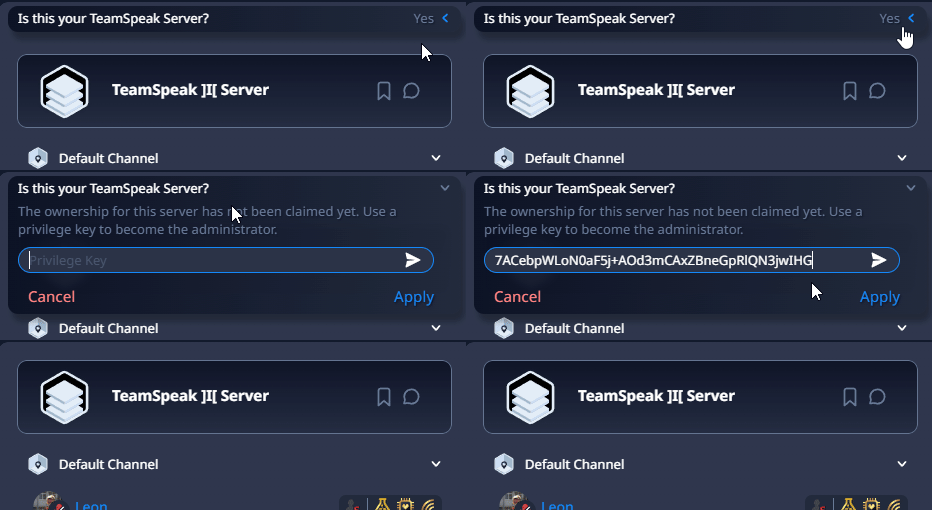
Yeah, I didn’t saw that message, I only saw the option in the right click menu and when I first clicked it, the message itself was shown but the field to enter the key wasn’t opened automatically I had to click it manually
How can this be done in the TeamSpeak6 client or is it only possible with 3? I can add the address but can’t see where to apply the privilege key.
