When you activate sound mute, the mic also becomes muted but the client does not show the mic mute symbol icon. It looks like the microphone is still active even when it is already muted. Some colleagues I brought over from the other (clearly inferior) platform were confused, because they are used to seeing a clear mic mute icon when sound mute is on. It would be helpful for new users if sound mute also showed the mic mute symbol and if unmuting the microphone would turn off sound mute automatically.

To be honest, I am not sure about this. Yes Discord more clearly shows the current state, but with it fails to properly communicate the state change when you click one of the buttons.
This is the automaton diagram for the Discord mute transitions. You can clearly see the two visually identical states with different behavior when the sound mute button is pressed.
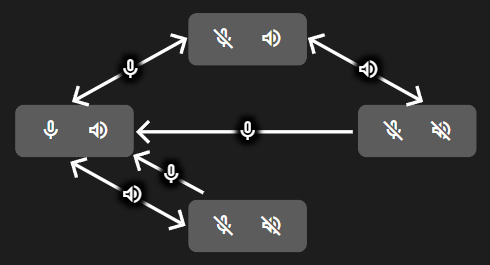
TeamSpeak has a more straight forward automaton at the cost of visual clarity considering the current state.
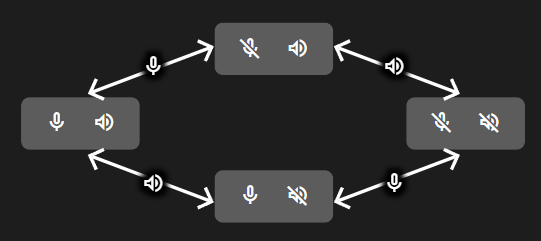
So with TeamSpeak you do not see that you are not talking, so at most you are not transmitting when thinking you actually are.
While with Discord you can not be sure what happens when you are sound muted and click to sound mute button, it might happen that you expect to stay muted and start to hear others again, while in fact you also unmute your microphone. In short, you might transmit when thinking you are not.
So both have drawbacks, but of the two I clearly prefer the route TeamSpeak took here, as this way you can never transmit anything you did not intend to (caused by the button behavior).
Also, this analysis completely skipped over the microphone / headphone disabled logic in TeamSpeak that is even more complex, but most users should not be affected by this.
5 Likes