I reset my PC and i lost identity and i have VIP on one server ? Can i get back my identity ?
I guess you are not using the TeamSpeak client but rather the TeamSpeak 3 client. So please move this thread to the corresponding topic.
There are a few ways you could get back the identity.
If you are using myTeamSpeak (this is required for the new TeamSpeak client not TeamSpeak 3 though) your identities should by default be backed up to the myTeamSpeak servers.
After logging in to your account you can find any identities here:

I guess you are not using myTeamSpeak, so the only way to get your identity back is restoring a backup. If you exported your identity before resetting your PC you can just import this back into TeamSpeak and use it instead of the newly created one.
If you don’t have this either I don’t think there is a humanly possible way to get this account back.
So for the future just backup everything or link everything to accounts (in this case myTeamSpeak) so you don’t use any valuable data with a device.
If you dont have myTeamSpeak or you lost your identity, than is the only way to ask an Admin, if you can get your VIP Rights back.
Hello there,
i flushed my drive yesterday and now my old identity seems to be gone. I logged into TS3 with my TeamSpeak account, but my favs and identity aren’t shown. 
Can someone please tell me how to get my identity back? Thanks
i have the same problem!
You do not had them synced (yes can be deactivated)
- or you are not logged into your account
- or your account could not be encrypted because you did a password reset and you did not enter the required recovery key yet
- or your account could not be encrypted because you did a password reset and you did not enter the required recovery key and made a fall back instead
With lack of log or details this is all we can guess.
Hello. I have a question, is there an option to recover an account on one of the servers (zagrajmowo.pl)? I was doing a computer format and I lost my account (ID: s5wW4eVnrwx8DC99nv0u9z/bPms =) and I already had server ranks and badges. Thank you in advance.
Only you can recover your ”server accounts” (tied to TS Identities), but only if:
a) an Identity you used to enter this server has been synced on myTeamSpeak, you are logged in to the same myTS account and haven’t tried to reset password while being logged off;
b) you have a local copy of that Identity;
c) you have your Recovery Key in case you had reset your password.
In option A, just simply log in to the same myTS Account you were using when joining that specific server and your ranks and everything should be fine.
In option B, you’ll need to import that Identity and connect to server using it. That’s all.
In option C, after you log in, there should come out an error that myTS cannot decrypt your data. In this case, paste your Recovery Key (which you should have saved in safe place, as mentioned by TS Client) and accept what’s next. Your data will be decrypted and you should get new Recovery Key after that.
If you had no myTS Account, haven’t synced any Identities, haven’t saved them locally and/or haven’t saved your Recovery Key you’re screwed, cause
no one beside you, even TS Devs/Admins/Staff cannot help you!
This is a great lesson for you for the future.
I recently just wiped my whole PC, so when I reinstalled TeamSpeak and logged back in, it appears nothing has saved, such as my bookmarks, etc.
I am not sure what to do to get everything back, considering it all should’ve been saved, right?
I have my Synchronization turned to automatic so I am not sure if I am doing something wrong.
You also had to make sure that your bookmarks and identities were stored in the synced area of each of these settings. Otherwise there were only stored locally.
If you did a password reset recently and had you had not entered your recovery key all synced data has been deleted as that is your key to decrypt your data which is/was stored encrypted on TeamSpeaks servers.
How do I make sure that my bookmarks and identities were stored in the synced area?
Just right click the items that are in local and click move to synced. Now they will sync up if you login on a different device if they are not beeing deleted somehow. (But already deleted identities and bookmarks cannot be restored)
CTRL + I opens the identities menu
CTRL + B opens the bookmark menu
i reinstall windows now my all server stats plus private key etc gone its reset
Were your Identities synced with myTeamSpeak?
Is it possible that you reset your password in order to log back in?
i just check i didnt know about Identities every time i install new window its create new Identity thanks man
hello, after formatting my computer and logging in to TS3, I don’t have any ranks, contacts and other things, how to fix it
If you have not backed up your old data (or used TS on a second device), there is no way to recover it.
i recently got a new computer before i logged on i uploaded my identity and why i got on my new computer i downloaded the identity logged in and i lost all my bookmarks addons contacts everything was acting like it was a whole new account used the same login and it acted like it was a brand new account
If you still have access to your old computer you need to move all your Identities as well as the Bookmarks to the Synchronized Items area.
Only by moving them to the synced area they will become available from your myTS account, otherwise they are only available locally.
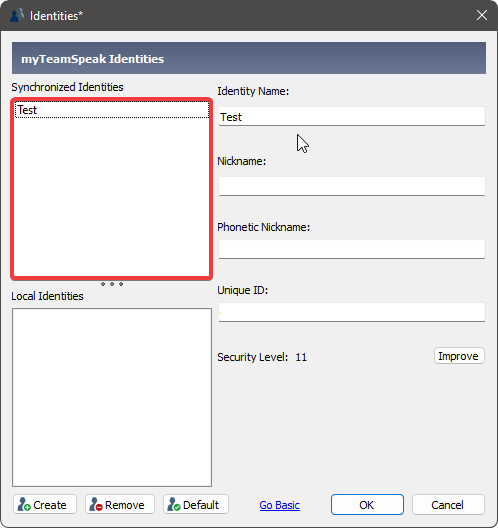
To open this menu press: CTRL + I

To open this menu press: CTRL + B
